

MaaEnd Configuration Guide
What is MaaEnd?
MaaEnd is a third-party automation tool for Arknights: Endfield. Based on visual AI technology, it can automatically complete repetitive daily tasks such as Protocol Space.
For more information, see:


Install MaaEnd
- Download the archive from
MaaEnd Website
orMaaEnd Repository
. - Extract the MaaEnd archive to any folder.
Reminder
Do not extract MaaEnd into a path containing Chinese characters to avoid unnecessary errors.
Like other scripts, MaaEnd must not be placed in the MAS root directory to avoid the risk of accidental deletion.
Configure the Script
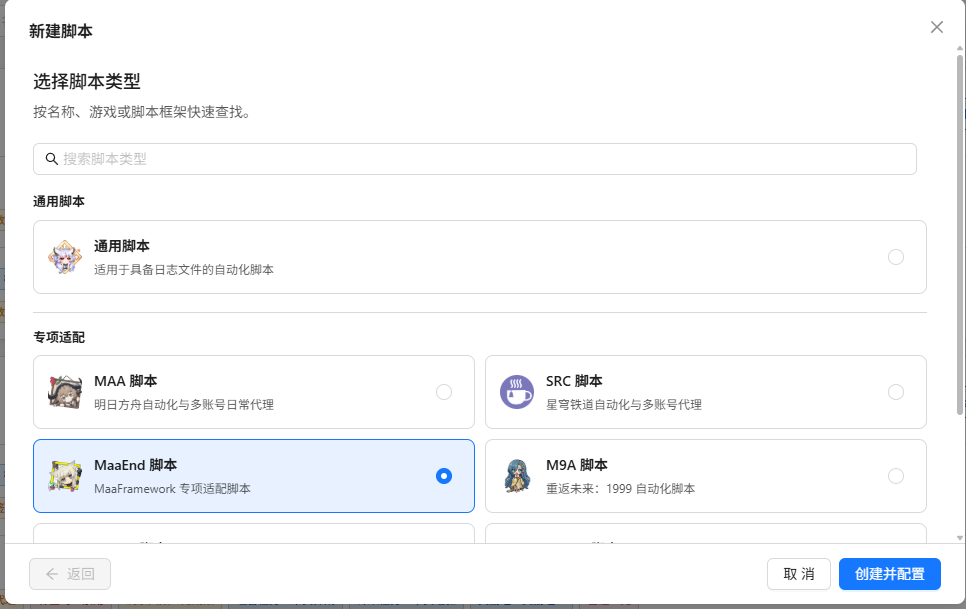
Go to Script Management, click New Script, and select MaaEnd Script.
In the opened script configuration, click Select folder for MaaEnd path, then open the directory where MaaEnd is located.
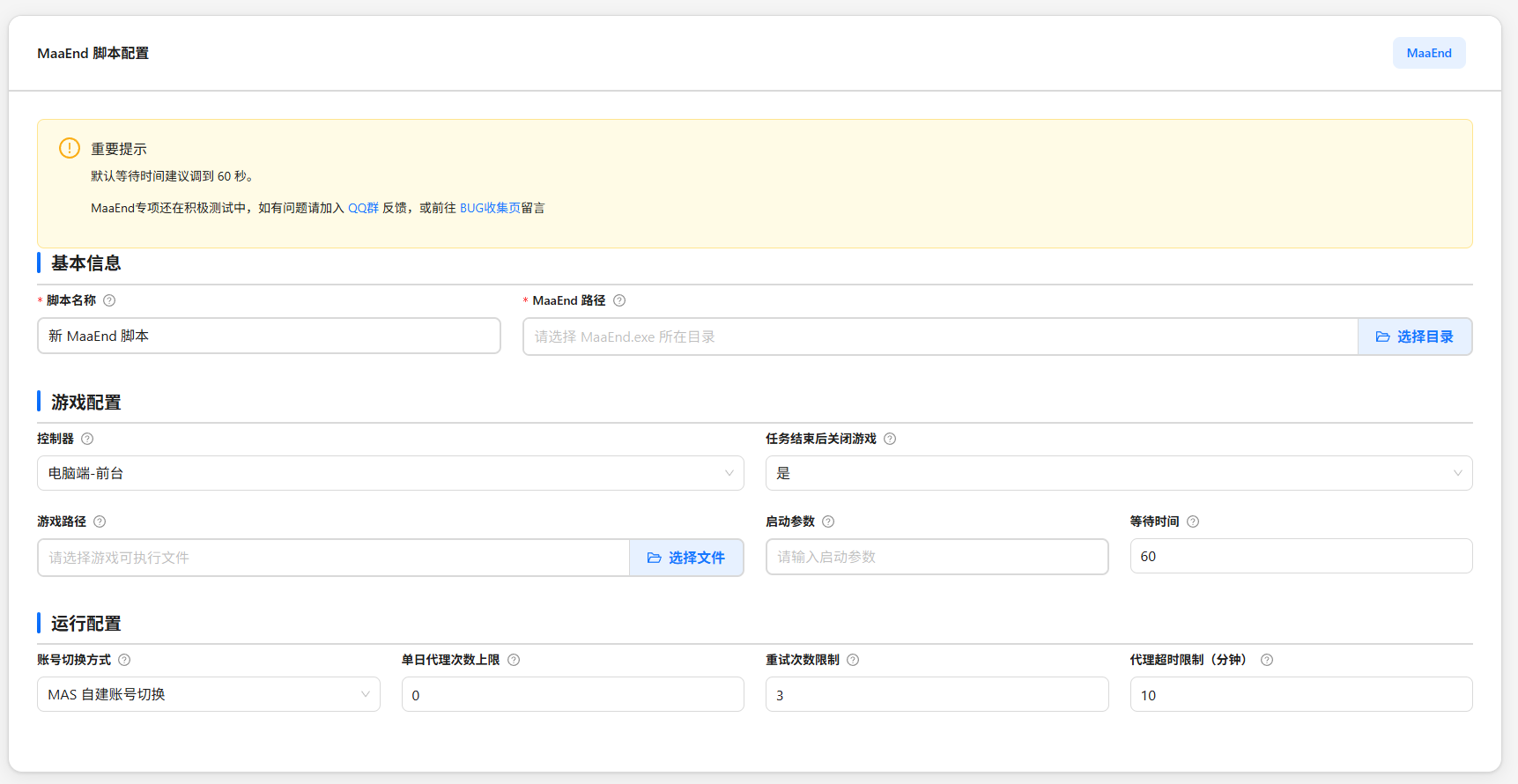
Adjust the following configuration as needed:
Configuration Description Controller type Select the control method. This overrides the setting configured in MaaEnd. We recommend using the PC client. Emulators require an update to v5.4.0 or the public beta to be usable. Game path (PC) Path to the Endfield game executable Game launch arguments (PC) Extra command-line arguments when launching the game. Leave empty if not needed. Wait time after game startup (PC) How many seconds to wait after launching the game before automation starts. Default is 60 seconds. Close game after task completion Whether to close the game automatically after the last user task completes Proxy timeout limit Consider the task timed out if logs do not change for this many minutes. Default is 10 minutes. Daily proxy count limit Maximum number of automation runs per user per day. 0means unlimited.Maximum retry count per run Maximum retries after automation failure. Default is 3. Click Save Configuration.
About Emulators
- ADB: controls Android emulators through the ADB protocol. The emulator must be configured in Emulator Management.
- Due to a change in the upstream MFW naming rules, you need to update to v5.4.0 or the public beta so that emulator parameters are passed correctly.
Configure Users
In the script table under Script Management, click Add user to add a user.
Fill in user information according to the hints on the settings card.
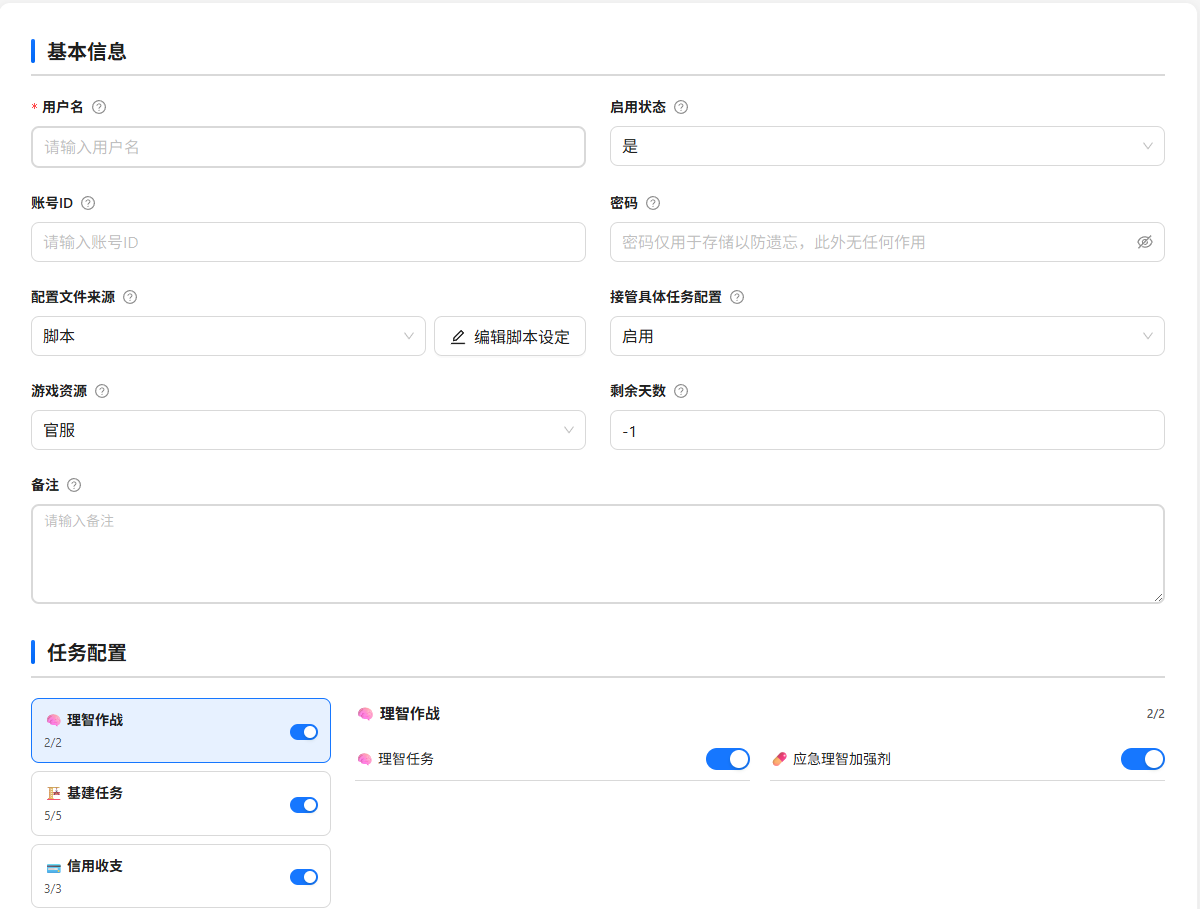
User Configuration Fields
Basic Information
| Configuration | Description |
|---|---|
| Username | Display name used to distinguish accounts |
| Enabled status | Whether the user participates in automation. Disabled users are skipped. |
| Account ID | Endfield login phone number, 11 digits. Leave empty to skip account switching. |
| Password | Endfield login password, stored encrypted. Has no effect. |
| Configuration source | Script-level uses the script-level MaaEnd configuration; User-level uses that user's independent MaaEnd configuration |
| Take over specific game configuration | When disabled, the task configuration below is unavailable and automation only runs according to the saved configuration file. |
| Remaining days | Remaining valid automation days. -1 means unlimited. After each successful automation, it decreases by 1. When it reaches 0, the user is skipped. |
| Notes | Free-form notes |
Task Configuration
MAS will try to enable/disable tasks according to your settings; tasks that do not exist are skipped.
Sanity Task Options
Only appears when the sanity task is enabled, allowing you to quickly modify the sanity task within MAS. 
Account Switching Notes
We recommend using "MAS built-in account switching", which generally offers better stability; if it fails, you can also try switching to MaaEnd account switching. MAS will automatically add the account-switching task for you, so you do not need to add it manually.
Skland Automatic Check-In
Migrated to the check-in tool.
Result Push Explanation
If you have enabled mechanism filtering for the matrix farming task, MAS will additionally push the matrix farming results to you.
If you have enabled gacha count calculation, MAS will additionally push the gacha count calculation results to you.
FAQ
- Endfield takes a relatively long time to start. We recommend not lowering the default wait time of 60 seconds.
- Foreground mode fully occupies the mouse. Operating the keyboard or mouse during automation may cause automation to fail.
- Make sure the game path points to
Endfield.exe, not the Hypergryph launcher. - In fullscreen mode, resolution is determined by monitor resolution settings. Changing it inside the game is meaningless. MaaEnd requires a 16:9 resolution ratio.
- Do not enable frame interpolation or similar features, as they may cause MaaEnd screenshots to fail.